Introduction
My most recent work: Chronicle, a macOS app that helps employees track and show their work at Apple while building a path toward their development goals.
The problem
Most of us at Apple use multiple internal-approved tools every day. Radar to track and update tasks, Slack and Mail for text communication, Claude for AI-assisted workflows, and Webex for meetings.
Looking back on what you accomplished each day or week becomes a cognitively demanding task: recollecting, listing, and connecting activity across all of these platforms. A person’s productivity often becomes visible only when they can communicate it efficiently to management. Regularly scanning every app and aggregating your daily and weekly contributions adds significant cognitive load. If someone can’t do this manually and frequently, that shouldn’t block their work, or their visibility.
Meet Joe — a user journey
To ground the design, I followed a representative user through his week.
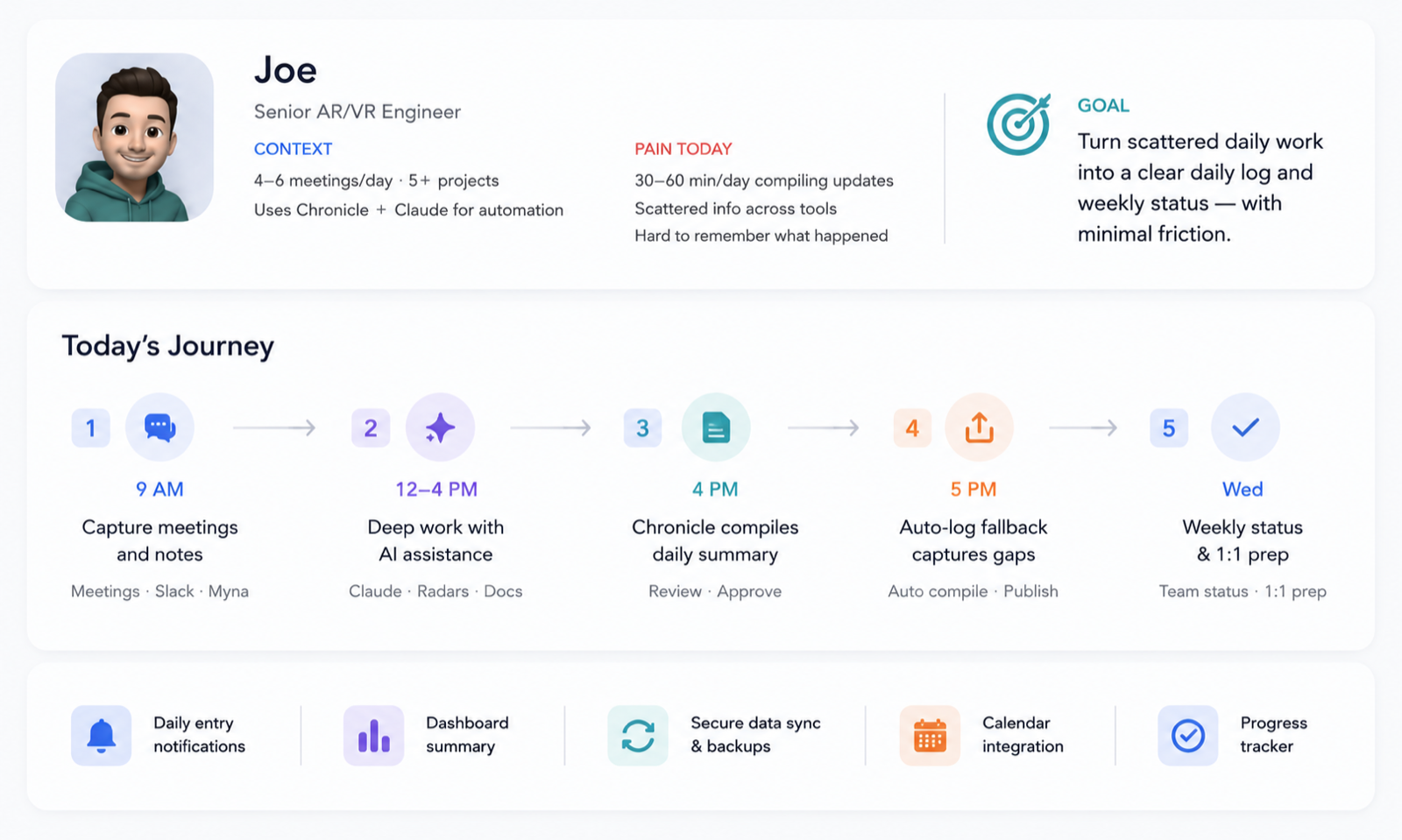
Joe is a senior engineer at VPG. His team collects a weekly status update every Wednesday and compiles it for the VPs and Directors. Joe spends his mornings in meetings, updating Radars, and sending email. After lunch he carves out time to code and push commits. At the end of the day he’s usually finishing work and syncing with colleagues instead of logging what he did.
Come Wednesday, he struggles to remember everything from the past week. This is where Chronicle steps in. At his preferred time and day, it not only reminds him but auto-fills the day’s work and asks him to review it. Joe quickly scans the updates and accepts them, and Chronicle writes them to his private Confluence page. If Joe is slammed that day, Chronicle still writes what it knows, with a note that it needs review.
Where does AI actually help?
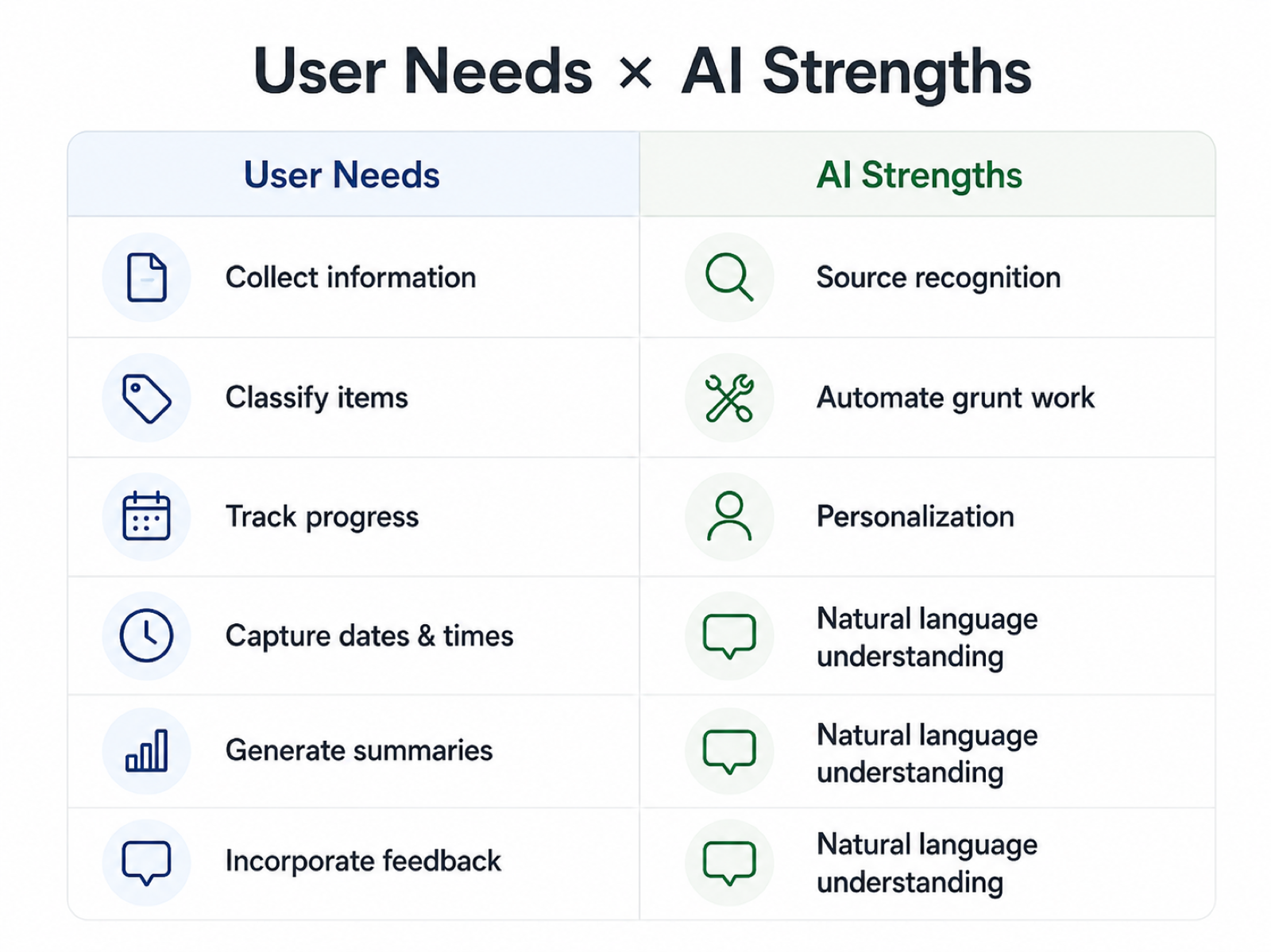
With AI integrations available across many of our tools, I asked: why not centralize the data from different apps into one place? To recognize where AI can help, I listed actual human needs and verified whether AI is genuinely a good candidate for each task.
After all, AI comes with gotchas: token expenditure, added computation time, and a chance of inaccuracy. We want to use AI to solve problems users truly want to delegate to automation, and distinguish those from features where AI simply helps the user take the lead. This mapping captures the areas where AI is a good candidate right now.
The prototype
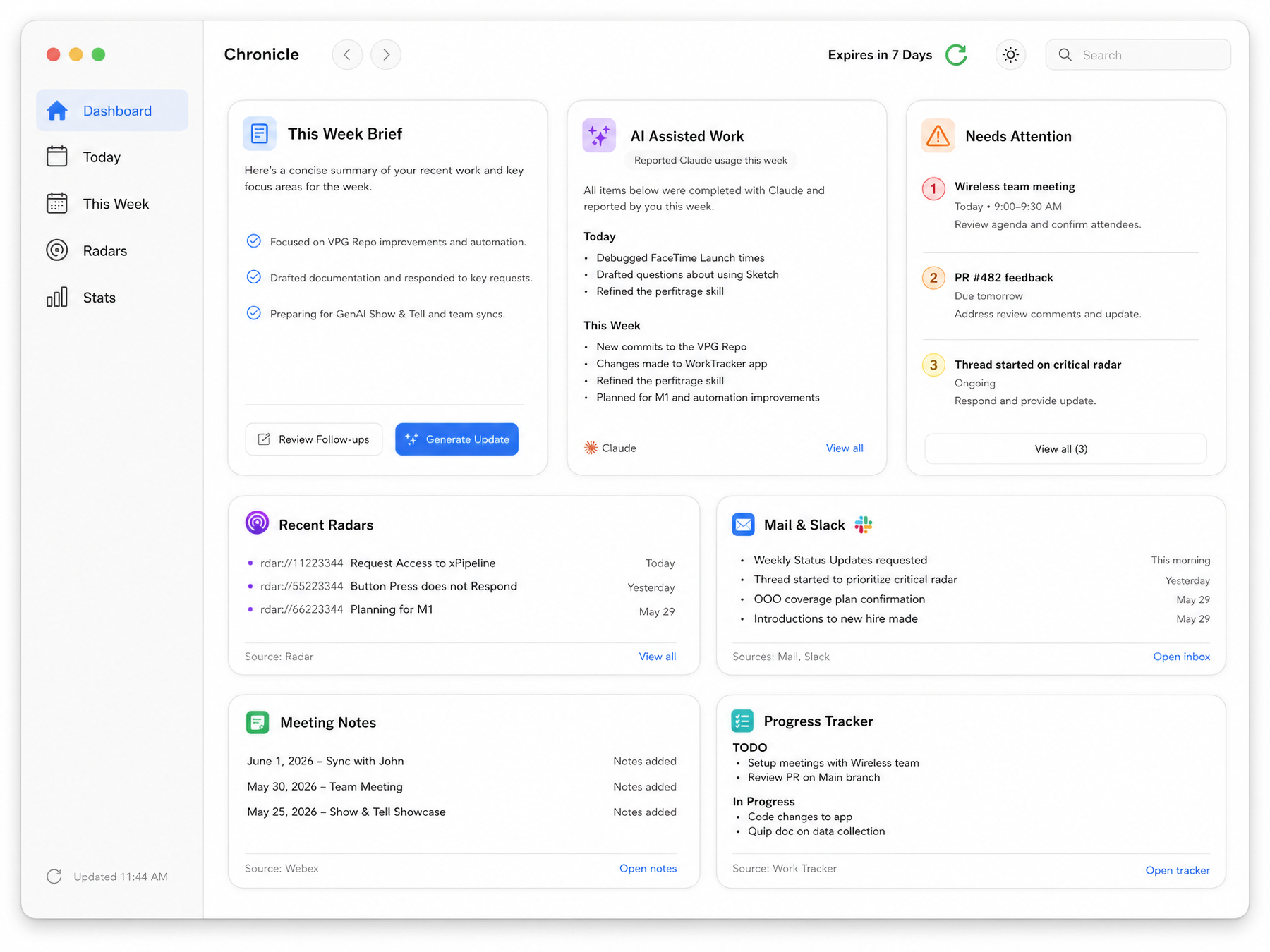
Clean summaries from different sources give quick information. Tabs like Today and This Week offer different levels of detail, and users can view all the Radars touched that week. Finally, Chronicle generates a text summary the user can review and edit before publishing to Confluence.
This way the AI can look back and track progress week to week, using previous weeks’ updates as context. Chronicle also generates a TODO list interpreted from other sources, helping users stay on top of communications across platforms.
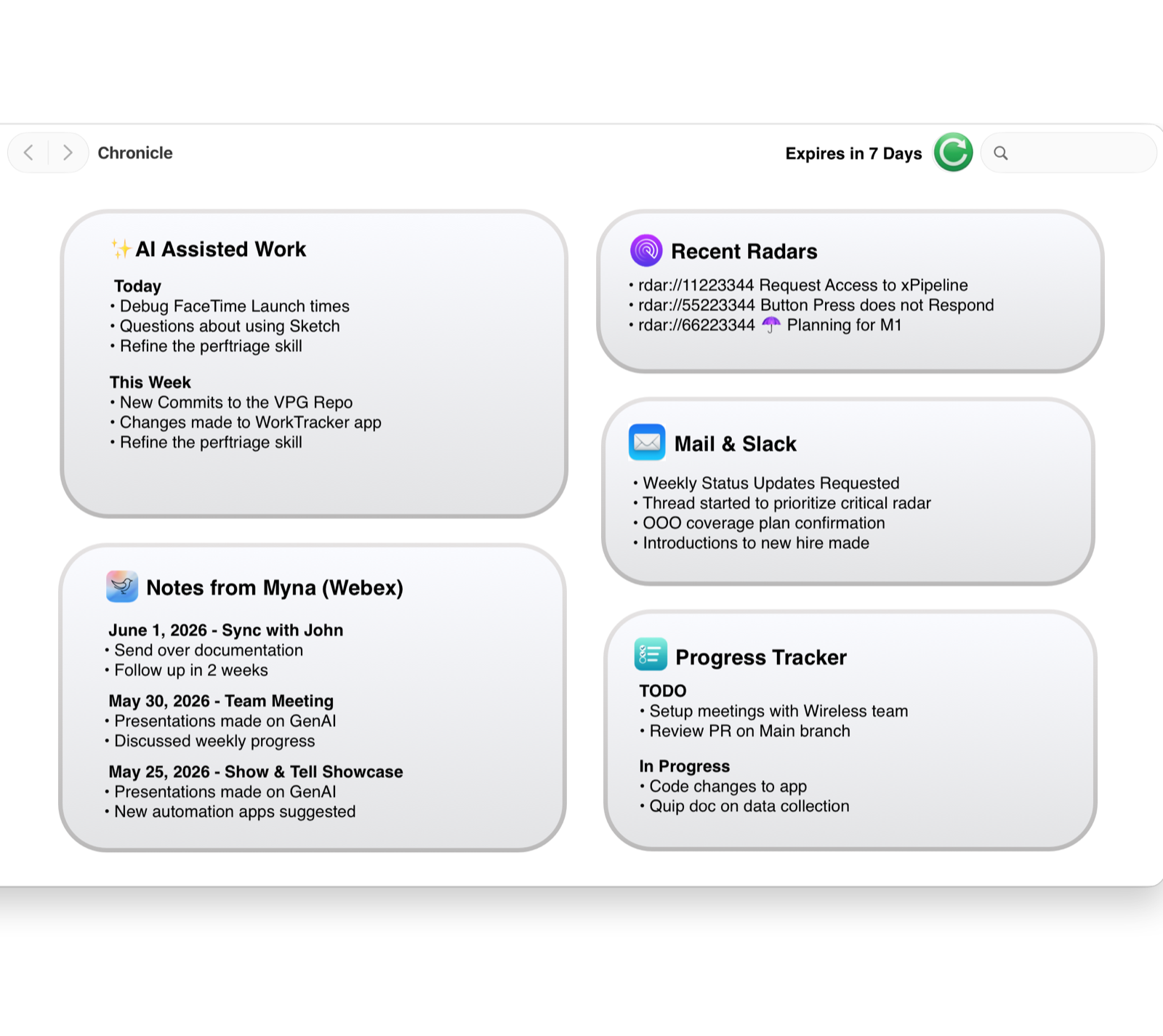
The current iteration removes copy-paste entirely: users open source apps directly through a widget-style interface.
From concept to working software
I designed and built Chronicle end to end as a 0-to-1 native macOS application in SwiftUI, taking it from early information-architecture sketches to a standalone GUI app distributed as an internal test build.
The implementation uses a privacy-first, on-device pipeline to bring together work signals from approved sources. Claude Code and MCP integrations help turn those signals into draft updates, while the application keeps the user in control of reviewing, editing and publishing the result.
I structured the experience as a clear sequence of software responsibilities:
- Collect activity from the sources a user explicitly enables.
- Organize it into daily and weekly views with traceable source context.
- Generate a draft only where AI meaningfully reduces manual work.
- Review and edit before any information is published.
- Learn from feedback without hiding uncertainty from the user.
Building the complete application forced product and engineering decisions to evolve together: the data available through each integration shaped the interface, while privacy, failure states and review-before-publish requirements shaped the software flow from the beginning.
Making sense of the data
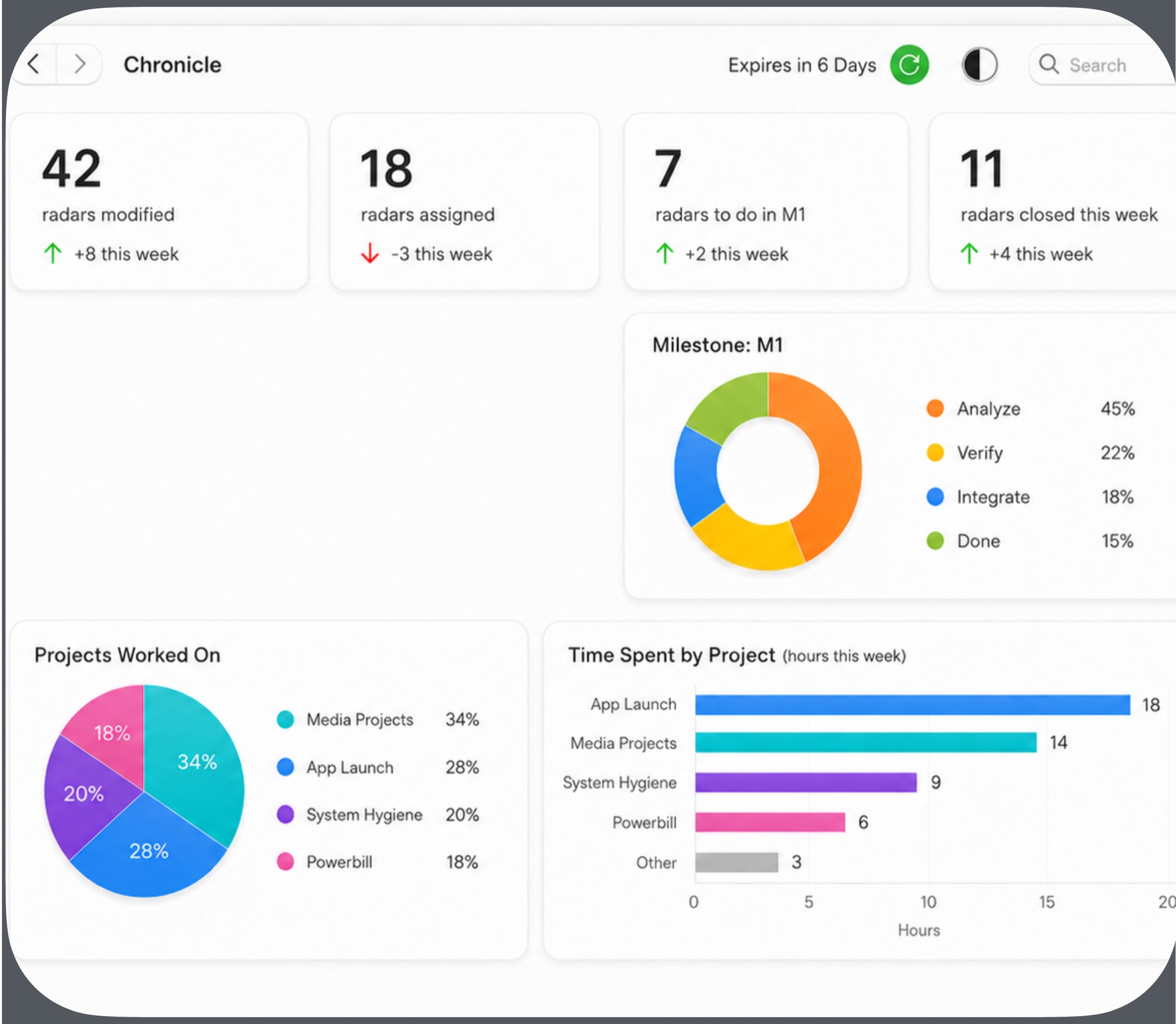
A stats view was the starting point for helping people understand their work over time. The first iteration presented the same activity as numbers and charts: Radars modified, assigned and closed, milestone progress, projects worked on and time spent by project. It made the work measurable, but still left the user to interpret what mattered and decide what to do next.
Iteration 1 — A Stats view
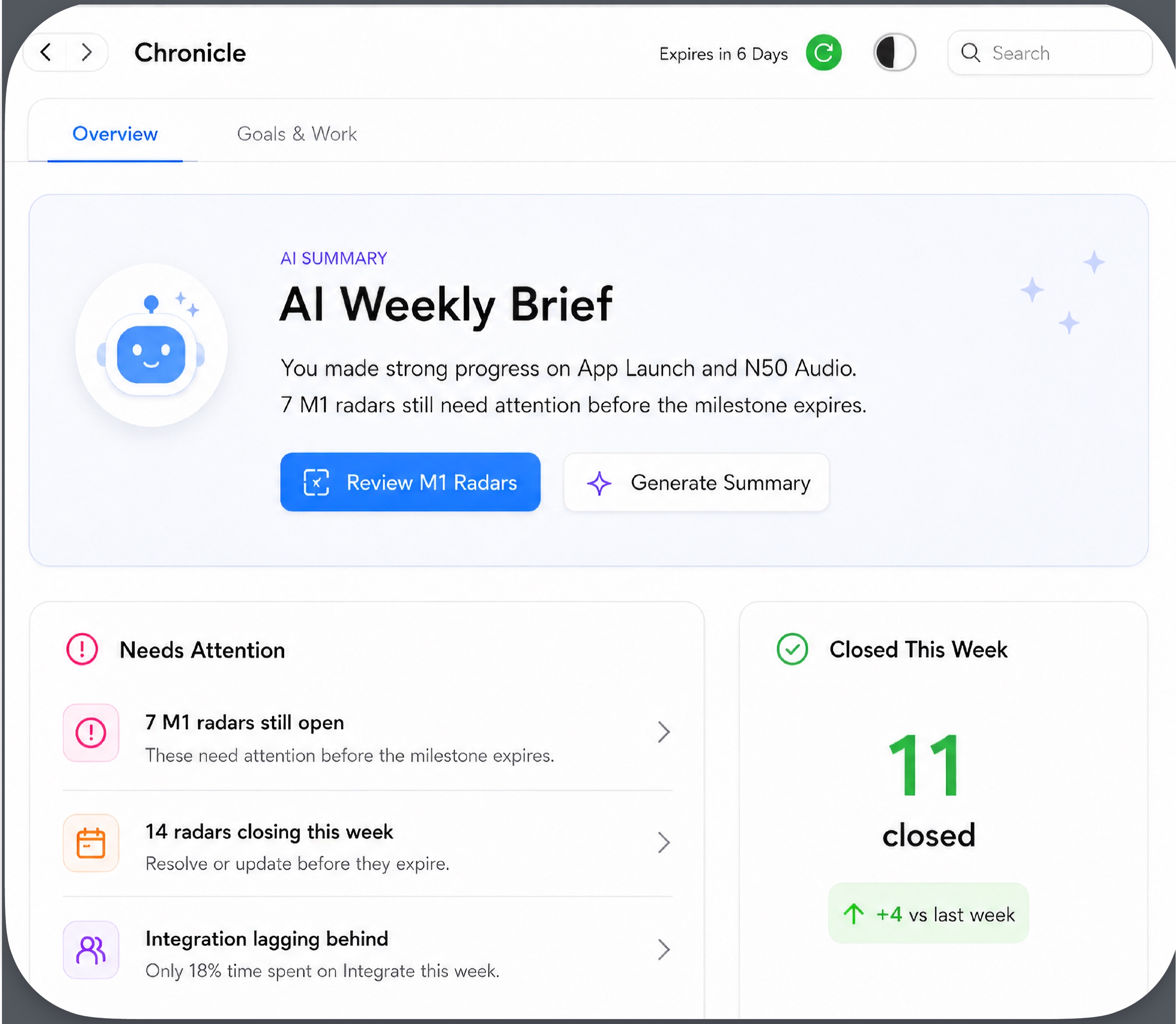
The next iteration reorganized the same underlying data around decisions instead of charts. An AI Weekly Brief summarizes progress and flags the most important issue, while direct actions such as Review M1 Radars and Generate Summary make the next step clear. Needs Attention and Closed This Week turn passive metrics into a prioritized view of what requires action and what changed.
Iteration 2 — An actionable Overview
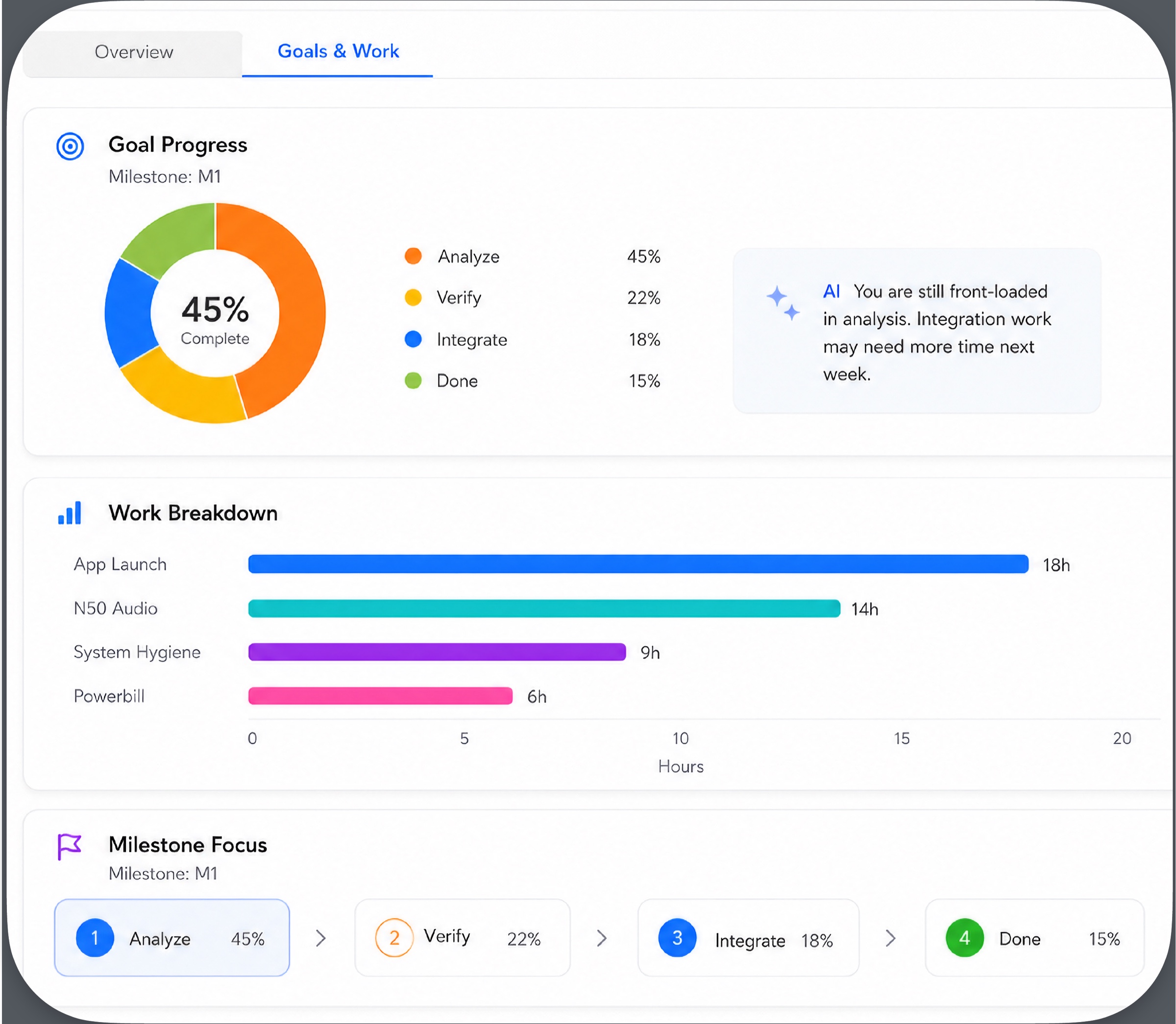
The Goals & Work view preserves the analytical detail for people who want to dig deeper, but connects it to a clear purpose. Goal Progress shows milestone completion, Work Breakdown makes time allocation visible, and Milestone Focus maps progress across stages. Instead of stopping at a visualization, Chronicle interprets the trend — for example, noticing that work is front-loaded in analysis and that integration may need more time next week.
Iteration 2 — Goals & Work
The evolution was not about adding more data. It was about improving the information hierarchy so that users could move from what happened, to what needs attention, to how the work connects to goals — and bring that evidence into planning conversations with a manager.
Privacy & control
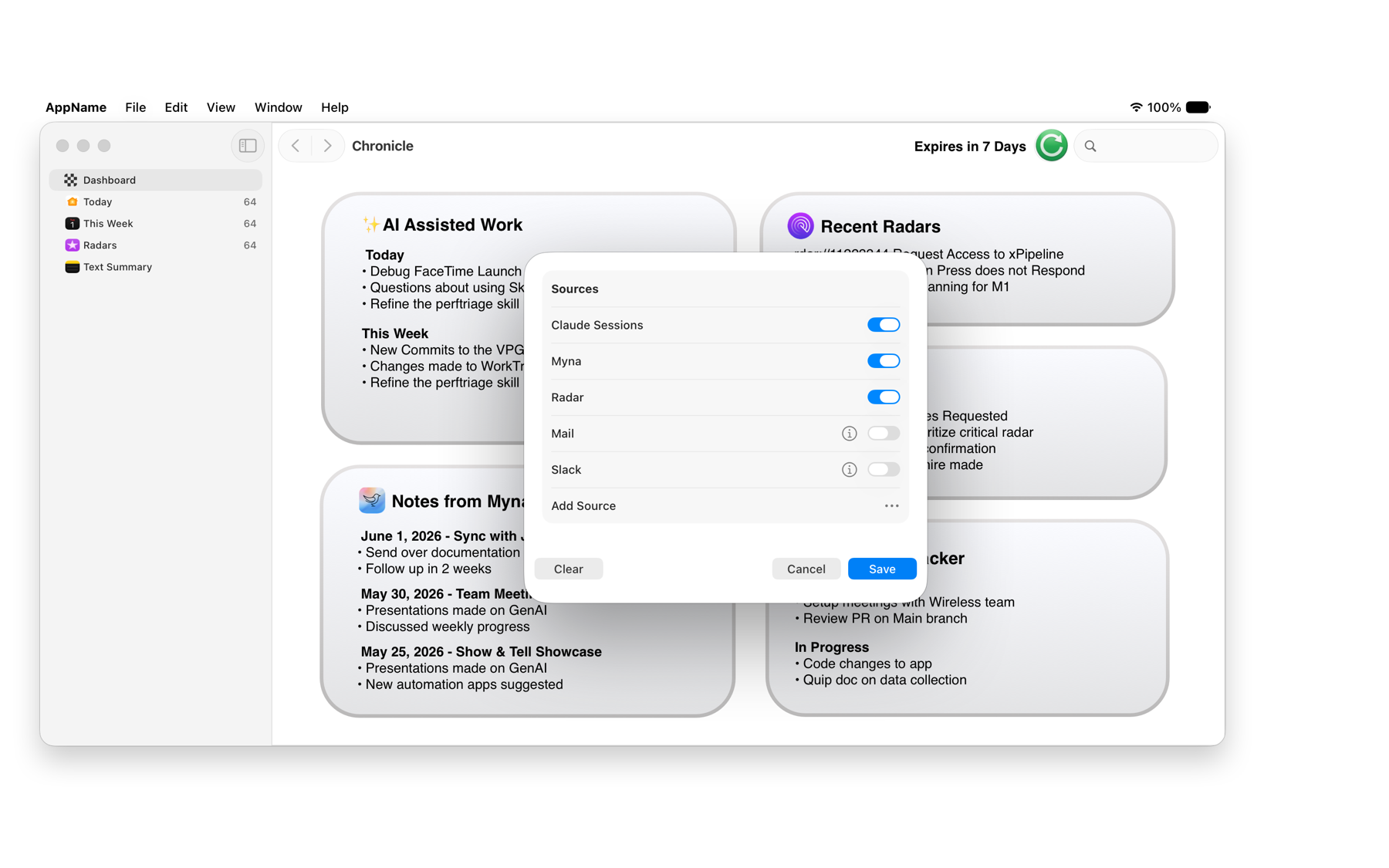
We talk so much about information and data, but assuming all data is equal and open is an easy route to violating user privacy. Some teams work on black or secret projects that are prohibited from AI visibility. We always want to let users control what we automate. Something as simple as letting them filter which sources we pull from gives them control over their work and confidentiality.
Review, correct, improve
Users should always get a chance to review and correct any mistakes AI makes. Frequent feedback greatly personalizes the reports AI generates: let users mark what we got right and what didn’t work, and use that input to generate better, tailored reports over time.
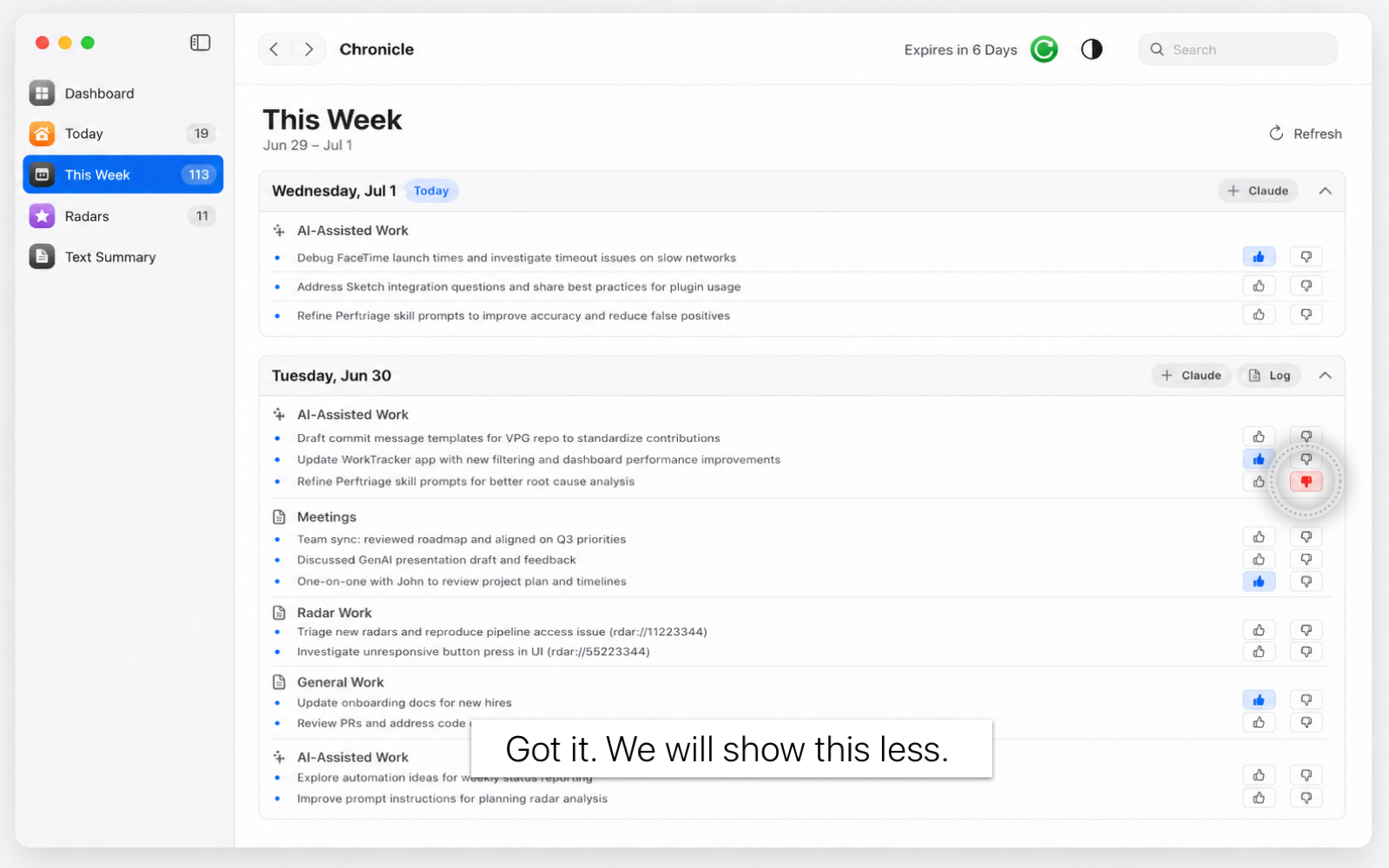
There is always uncertainty in AI’s interpretations. While the model (Claude) can be configured by the user for their effort allocation and tolerance for hallucinations, work reporting to management requires accuracy. When the model finds information that needs clarification, we surface it, and always encourage users to review and correct before publishing to Confluence.
What’s next — goal tracking
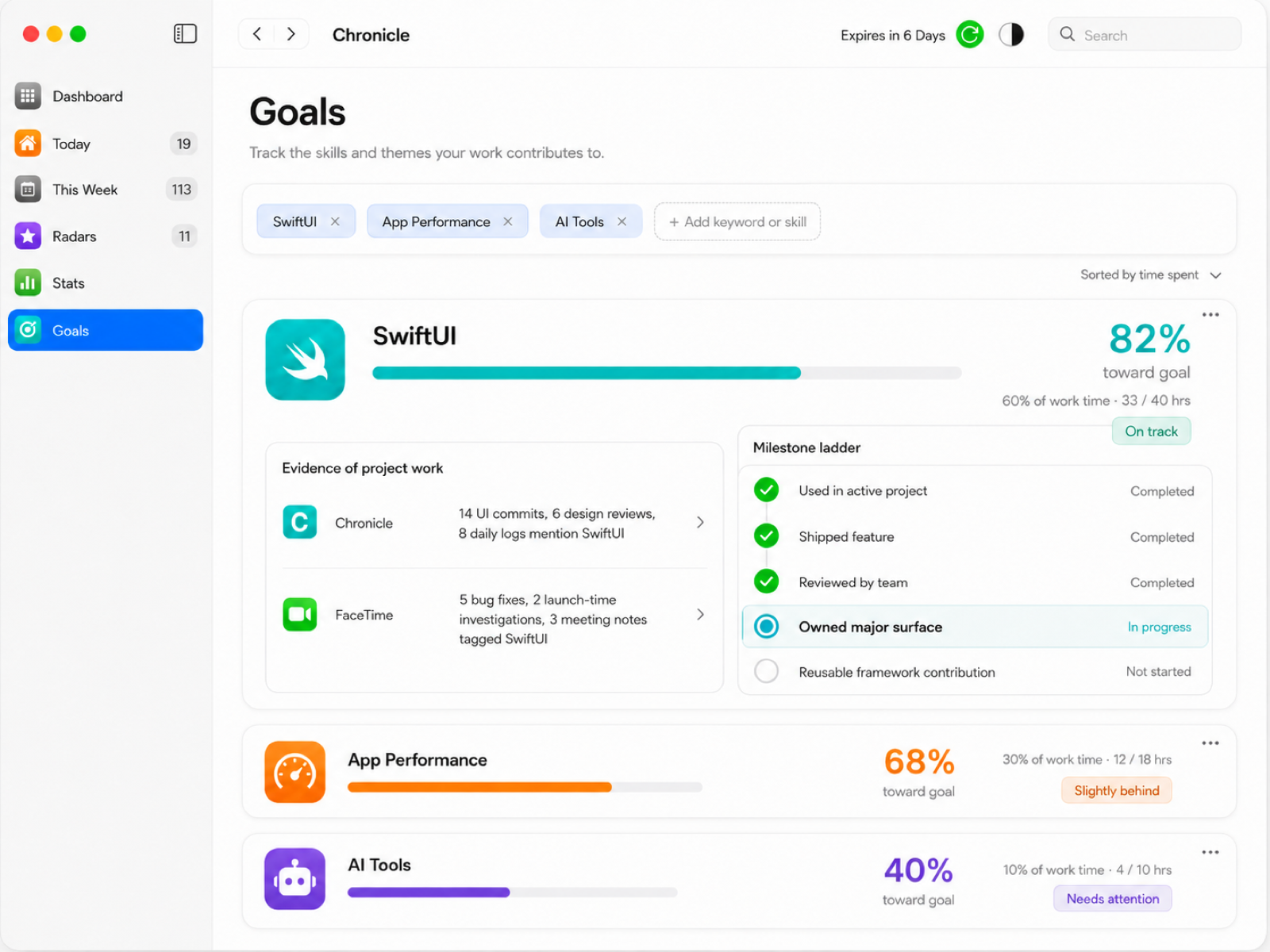
Next, I want to add a goal tracker. The previous features help users gain visibility and quantify their work, but what else does someone look for in their career? We’re encouraged to write development goals each year at performance reviews, and depending on the team and the nature of the work, tracking them can be tricky.
This tool tracks your work and matches it to the goals you’ve set, so you can see clearly how you’ve grown over time in acquiring skills and expertise, and which projects on your list can help you get there.
What I took away
Chronicle gave me a repeatable framework I now apply to any AI feature:
- Map user needs against what AI is genuinely good at, and only use AI where they overlap. Everything outside that overlap is a heuristic or a user toggle. An app with AI can do many things, but focusing on the human problem at its core makes the most impact.
- With AI that acts on your work, control and trust are the product. I bake in source control, feedback, and review-before-publish from the start rather than bolting them on.
- Low-fidelity first is part of my playbook. I validate the information architecture in plain text before spending a minute on polish. That’s now how I approach every AI prototype.